
Your Nepali Date,
Your Way.
A desktop widget that shows the Nepali (Bikram Sambat) date, specially designed to directly view above your taskbar.
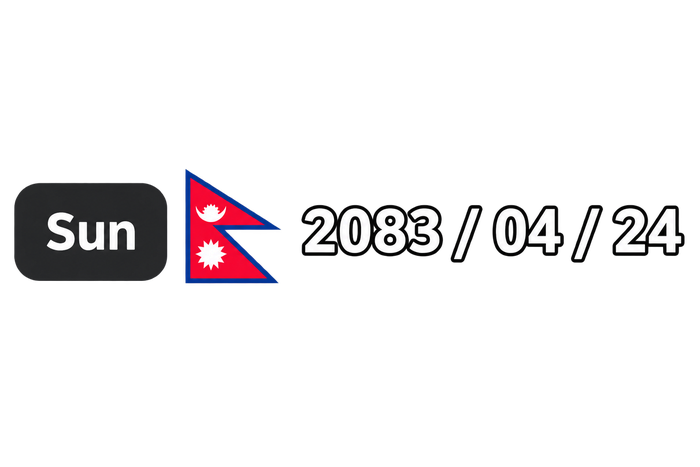
Every detail, considered.
The widget does one job — showing your date — and does it so quietly you'll forget it's software at all.
Theme auto-adapt
Detects Windows Light or Dark mode and shifts its colors instantly — no restart, no flicker.
Auto-updates
A background thread checks GitHub Releases quietly and tells you when something new lands.
Customizable layout
Toggle the day-of-week badge beside the flag straight from the context menu.
Zero-distraction design
Frameless, borderless, truly transparent — rendered with per-pixel alpha blending.
Smart auto-hide
Steps aside the moment you go fullscreen for a game or a film, then returns on its own.
DPI aware
Crisp text and glyphs on 4K displays — nothing soft, nothing blurred.
Professional installer
A standard Setup.exe with Start Menu shortcuts and a clean uninstall. No admin rights needed.
System tray access
Right-click any time for quick settings — themes, startup, and update checks.
Live on your desktop,
right where you need it.
Watch how effortlessly the widget integrates above your Windows taskbar. Seamless Bikram Sambat date visibility, zero clutter, and native desktop aesthetics.
Instant At-A-Glance Date
Always stay oriented with today's Bikram Sambat date at a glance—no browser opening or app switching needed.
Freely Position & Lock
Right-click to unlock and place the widget anywhere above your taskbar or screen edge, then lock it for click-through convenience.
Pure Native & Zero Distraction
Crafted with true per-pixel transparency and smooth acrylic glass effects that blend naturally into your Windows setup.

Native Win32.
Nothing borrowed.
No Electron, no browser runtime — just the Win32 API and GDI+, talking to your OS directly.
Stays on top
A quiet 250ms timer re-asserts HWND_TOPMOST, so Windows never buries it behind other windows.
Survives taskbar previews
Intercepts WM_SHOWWINDOW to veto SW_PARENTCLOSING, so hovering an open app can't hide it by accident.
Works 100% offline
Converts and renders the Bikram Sambat date locally on your machine — zero network requests, tracking, or internet connection needed.
Syncs with Windows live
Listens for WM_SETTINGCHANGE and repaints the instant you flip Light or Dark mode.
It checks the clock.
It doesn't watch it.
Once a second, the widget asks Windows for today's date — a near-zero-cost call. Only when the day actually changes does it run the Bikram Sambat conversion and repaint.
The single red tick is the one moment of real work — midnight, when the date rolls over.
Pick your way in.
Command line, package manager, or a plain installer — whichever fits your setup.
irm https://raw.githubusercontent.com/aayushlbef/Tithify/main/install.ps1 | iexPrefer a manual download? Grab Tithify_Setup.exe from the latest release. Unsigned builds may trigger a SmartScreen notice — More Info → Run Anyway gets you through.
Four clicks to settle in.
Unlock & position
Right-click the widget to unlock it, then drag it anywhere above your taskbar.
Lock it in
Right-click again and choose Lock Position — it becomes click-through and seamless.
Open the calendar
Left-click any time to bring up the full interactive Bikram Sambat calendar.
Make it yours
Right-click for startup, day-of-week, theme, and update settings.